
Vivabet Kenya app — Android and iOS
The Vivabet Kenya app puts the full platform in your pocket. Sports betting, Aviator, live casino, and M-Pesa deposits from Ksh 50 — all from your phone, wherever you are in Nairobi, Mombasa, or Kisumu. The Android APK installs in under 3 minutes. iOS users add the site to their home screen via Safari in two taps.


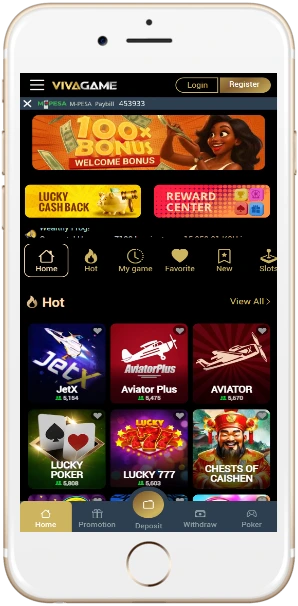
How to download the Vivabet Kenya app on Android
The APK is not on Google Play. You download it directly from the official site. The file is around 50–60 MB and requires Android 8.0 or higher. Before installing, you need to allow installs from unknown sources — this is a one-time setting.
- Open vivabet-kenya.com in Chrome on your Android phone.
- Tap the download link for the Android APK on this page.
- Go to Settings → Security (or Privacy on newer Android) and enable "Install unknown apps" for Chrome.
- Open the downloaded APK file from your notifications or file manager.
- Tap Install and wait — takes about 30 seconds.
- Open the app, sign in or register, and make your first deposit via M-Pesa.
If you get a "Play Protect" warning, tap Install anyway. This is normal for APK files outside Google Play. The app passes security checks — Vivabet Kenya operates under BCLB licence BK0001164.
How to add Vivabet Kenya to your iPhone or iPad
iOS users don't install an APK. Instead, Safari lets you pin any website to the home screen as an icon — it opens full-screen like a native app. Requires iOS 15.1 or later.
- Open vivabet-kenya.com in Safari on your iPhone or iPad. Must be Safari — Chrome on iOS does not support this.
- Tap the Share button at the bottom of the screen (the square with an arrow).
- Scroll down and tap Add to Home Screen.
- Edit the name if you want, then tap Add in the top-right corner.
- The Vivabet Kenya icon appears on your home screen. Tap it to open directly, full-screen, without browser bars.
The mobile site on iOS loads the same games and features as the Android app — Aviator, live casino, sports betting, M-Pesa deposits. No functionality is lost. The Safari shortcut updates automatically every time the site is updated.
What the app includes
Every feature available on the desktop site works on the app. Live betting, Cashout, Aviator, jackpot slots, live dealer tables, and full account management including KYC document upload and withdrawal requests. Push notifications are available on Android — you can set alerts for match starts, bet results, and bonus offers.
Sports betting
KPL, EPL, AFCON, NBA — 20+ markets, live in-play, Cashout
Crash games
Aviator, JetX, Lucky Jet, Spaceman — RTP 96.5–97%
Slots and jackpots
500+ slot machines from Pragmatic Play, NetEnt, Play'n GO
Live casino
HD live dealer tables — Lightning Roulette, Blackjack, Baccarat
M-Pesa deposits
Ksh 50 minimum, instant — T-Kash, Equitel, Visa also available
Push notifications
Android only — match alerts, bonus reminders, bet results
App technical requirements and performance
The Android APK is 50–60 MB and runs on any device with Android 8.0 or higher. Most mid-range phones sold in Kenya since 2020 — Tecno, Infinix, Samsung A-series — handle it without issues. The iOS version needs iOS 15.1 or later, which covers iPhone 6s and newer.
| Detail | Android | iOS |
|---|---|---|
| Install method | APK download | Safari "Add to Home Screen" |
| Minimum OS | Android 8.0 | iOS 15.1 |
| File size | 50–60 MB | No download needed |
| Push notifications | Yes | Limited |
| Auto-updates | Manual (re-download APK) | Automatic (live site) |
| Offline access | No | No |
| M-Pesa deposits | Yes — Ksh 50 min | Yes — Ksh 50 min |
Data usage is low — a typical 10-minute Aviator session uses around 8–12 MB. Fine for most Safaricom prepaid data bundles. The site loads in under 3 seconds on a standard 4G connection in Nairobi.